

We're Here to Help
Account Information
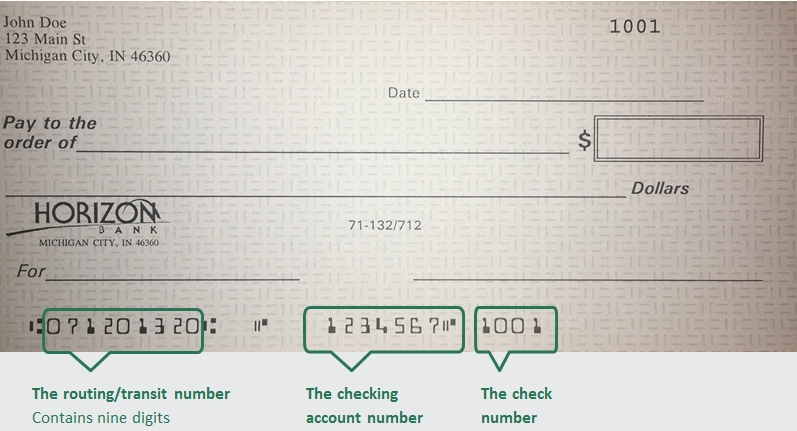
The Amercian Bank Association (ABA) routing/transit number and your Horizon Bank account number are located on the lower left-hand corner of your check as shown below. Horizon Bank's routing number is 071201320.
Personal Checks
To order checks click here. or you can contact your local branch. To find your local branch you can click here.
Business Checks
Order business checks here.
Contact call customer service at 888-873-2640 or visit your local branch for help with your account number
Personal accounts
Enroll Learn more
Business accounts
A business customer can enroll in online banking by contacting their Business Banker who will verify pertinent information and submit enrollment electronically. The customer will choose a login ID and temporary password during the enrollment process.
To open an account, we will need a valid US State or Federal issued ID, Social Security Number, and an opening deposit.
To reset your password for Online Banking Click here. You will be prompted to enter your login name and then can select how to receive a Secure Access Code. After successfully entering that code you will be able to set a new password.
Contact your local branch to begin the dispute investigation for this transaction. If after hours, call 833-735-1891 to report the transaction to the 24-hour fraud investigation team.
Please mail all general correspondence to our corporate office.
Horizon Bank
PO Box 800
Michigan City, IN 46361
Horizon Bank wants to ensure we do all we can to correct any issues you may have. You may submit your concern in any of the following ways:
- You can submit a complaint in online banking using the secure message function, located in Services & Settings
- By phone or in person at your local branch
- Contacting our Communications Center at 888-873-2640
- In writing by sending your letter to Horizon Bank PO Box 800 Michigan City, IN 46361
Horizon Bank provides guidelines for processing subpoenas and other legal documents, including summons, garnishments, and governmental inquiries. Subpoenas, and legal documents must be served on the registered/resident agent in the appropriate state. Horizon Bank also charges applicable fees for document requests, research, and delivery services. For more details on submission requirements and associated costs, refer to the full document linked below.
Bill Pay
Once you have accessed the Bill Payment Center in Online Banking, select Autopay (located next to the payee you wish to cancel). From this window you can turn off the autopay option.
To add an account, you can contact the Communications Center at 1-888-873-2640 and we can add another one of your Horizon Bank accounts to choose from for making payments in Bill pay.
Select "Bill Pay". From this screen select “Options”. This will open a small window where you select "Visit Bill Pay Site". You will see the same version used when logging into our full site with full functionality including scheduling payments and obtaining confirmation numbers.
To delete a payee in Bill Pay, login to your bill payment center. Select the drop down option located next to the payee you wish to delete. This should open a small window where you will select “Delete”.
CardValet Quick Reference Guide
Checking
There are several ways you can make a deposit into your Horizon Bank Checking or Savings account.
External Account. Link your account to an account you have at another bank. By doing this you can easily transfer funds
between your accounts.
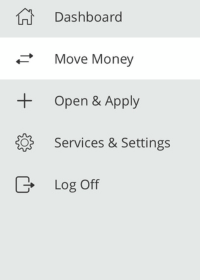
- Log in to Online Banking and click Move Money > Add External Account from the menu.
- Follow the instructions to connect your account.
We make two small deposits of random amounts into your account at the other institution. When the deposits are complete, you enter and verify the amounts in either online banking or mobile banking. The deposits verify your ownership of the account and that any future transfers to or from that account will process correctly. The deposits should take fewer than five business days to process.
Note: You can only request external transfer accounts held at domestic (the United States and US territories) FIs that use American Bankers Association (ABA) routing numbers.
Mobile Deposit. Deposit a check from anywhere, anytime with Mobile Deposit. Follow these steps on our mobile app to snap a picture of your check:
The first step is to enroll in Mobile Deposit.
- Log in to Online Banking and click Services & Settings > Mobile Deposit Enrollment.
- Download the Horizon Bank Mobile App, if you haven’t already.
- Click Deposit Check icon at the bottom of the screen and select your account and deposit amount
- Take photos of the front and back of your check (please write “for Horizon Bank mobile deposit” and sign your name on the back of the check prior to taking the picture.)
- Click Submit Deposit
ATM Deposit. If you live near a Horizon Bank branch or ATM location, you can make a check deposit at one of these ATM locations. List of ATMs that accept deposits.
Direct Deposit. Setup direct deposit in minutes. Direct Deposit | Horizon Bank
Make a transfer
To make a transfer between your Horizon Bank accounts, log in to Online Banking from the mobile app or your computer.
From our mobile app.
- Click the Transfer icon at the bottom of your screen
- Select the account you want to transfer from
- Select which account to transfer to
- Enter the amount of the transfer
- Is this one transfer or set setup the frequency you would like to make this transfer automatically
- Select the date to make the transfer
- Add a memo, if applicable
- Click Transfer Funds
From the computer
- Log in to Online Banking
- Select Funds Transfer from the Move Money Tile
- Follow all remaining steps as shown above
Transfers between Horizon accounts made after 9 pm CST on a business day will post on the following business day. Transfers made on a weekend or holiday will post on the following business day. External loan payments and external transfers submitted before 3 pm on a business day, will post on the following business day. Principal only payments can't be paid from an external account.
To close an account you may either visit your local branch or send a signed letter, requesting that your account be closed and mail it to:
Horizon Bank
PO Box 800
Michigan City IN 46361
If you're requesting that the remaining proceeds be mailed anywhere other than the address on file, you will need to sign the letter and include a copy of your state-issued identification or have it notarized.
When conducting an ATM transaction you may receive a service fee through Horizon Bank and one from the ATM machine.
To prevent service fees on our end, visit www.moneypass.com to find a surcharge-free ATM near you. You will still be charged a service fee from that machine, but not by Horizon Bank.
You can avoid fees altogether by using an ATM at a Horizon branch. Click here to find branches that have ATMs.
Certificate of Deposit (CDs)
A Certificate of Deposit (CD) is a savings certificate that entitles you to receive interest, restricting you from withdrawing on demand without incurring a penalty.
By opening the CD, you agree to leave your one-time deposit in the account for a fixed amount of time. In exchange for agreeing to a set term length, you get a fixed interest rate, typically one that is higher than a traditional savings account. Generally, the longer the term length, the higher the interest rate. Keep in mind, you often cannot access your money until your CD term ends without incurring a penalty. CDs are a great way to reach your savings goals faster-using money that you don't need immediately.
CDs are a great way to make your wealth grow, so long as you have clear financial long or short-term goals in mind for your money. With competitive rates of interest, you may get the most return on your money with this type of savings.
How much interest you earn on your CD will depend on how much you deposit, your specific term, and your interest rate. Contact a Horizon Bank advisor to review your rate and term options to see how much you can earn. You can also use a CD calculator to get an estimated return.
Most Horizon Bank CDs require a minimum deposit of $500 to open an account.
Often you cannot add money to an existing CD, yet you can open additional CDs for a shorter or longer term.
If you choose to withdraw money from your CD before it matures, you will likely have to pay a fee called an early withdrawal penalty.
Debit Card
Visit your local branch to receive an instant issue debit card or call 888-873-2640 to receive a debit card by mail in 7-10 business days.
For most accounts, the ATM daily limit is $700 and the daily Point of Sale (POS) limit is $5,000. Limits may vary based on your account type.
To activate your debit card please contact our card activation line at 800-992-3808.
.
Using the debit card frees you from carrying cash or a checkbook.
Your debit card transactions will be shown in detail on your monthly checking account statement.
Using a debit card means you no longer have to carry cash or overspend on credit cards when you travel.
Debit cards may be more readily accepted than checks, especially in other states or countries wherever MasterCard is accepted.
Obtaining a debit card is often easier than obtaining a credit card.
Enfact is a Debit Card fraud service that detects suspicious activity on your Horizon Bank debit card. Trained analysts watch for suspicious transaction activity on your behalf, 24/7, 365 days a year. If warranted, you can be contacted on behalf of Horizon Bank by phone from 877-253-8964, email or if you have a cell phone number on file and have enrolled in text messaging, you will receive a text alert from 20-733 to verify suspicious fraud activity.
After three invalid PIN attempts, your card is locked for an hour and is unable to be used. Once this timeframe is met, the card is able to be used once again. If you had forgotten your PIN, please contact our card activation line at 800-992-3808.
Did you receive a call, text, or email from Horizon Bank's fraud detection group? If so, respond to the email or text message. If you received a call, please dial 833-735-1891 and provide the case number you were given in the message.
Digital Wallet
Yes. Be aware that message and data rates may apply, depending on your device's data plan.
The safety and security of your account is a top priority. When you pay with a digital wallet and your Horizon Bank debit or credit card, your actual card number is replaced with a unique digital card number, which means businesses do not see or store your full card number. Plus, every transaction makes you verify your identity through your device, either by passcode, fingerprint, or face/retinal scan.
You may call Customer Service at 888-873-2640. For more detailed technical information, visit the website for your particular device.
From your smart phone, go to your wallet and follow the instructions given on your phone's screen.
- To setup Samsung Pay follow these instructions:
Choose the Samsung Pay icon - Log in using your Samsung account information. If you do not already have a Samsung account, you can create one.
- Once logged in click ADD CARD in Samsung Pay app
- Center the card in the on-screen window and Samsung Pay will read the card number. Or you can enter the card number manually.
- Verify or enter the additional information such as Cardholder Name, Expiration Date and Security Code (CVV).
- Accept the Terms and Conditions by clicking AGREE TO ALL.
- You may be prompted to select a delivery method for receiving a One Time Passcode, such as SMS, EMAIL or CALL IN. The One Time Passcode will be delivered to the destination selected.
- Enter the code received and touch SUBMIT.
- Once complete, your card is ready for use in Samsung Pay.
To set up Google Wallet you can use the following instructions
- Download and install the Google Wallet app from the Google Play Store.
- Open the Google Wallet app, and Sign In (if prompted).
- Tap the View Wallet button.
- Next, tap on the Add to Wallet button.
- Tap Payment Card, and then New credit or debit card.
- Next you will need to hold your card in the camera window that pops up. After the camera captures your card's information, verify your card's expiration date and CVC number.
- Verify your billing address.
- Tap the Save and continue button at the bottom of the screen.
- Read the Terms of Service, and tap the Accept button at the bottom of the screen.
- Choose to verify your card information with your bank via text or email, and hit continue.
- Next, you'll find yourself on the Verify Your Card screen. Choose where you want to receive the verification number.
- Tap the Continue button.
- When you receive the number, type it into the field on the Verification Number screen and tap the Submit button.
Enfact
Once enrolled, you may receive a text if unusual activity is detected on your account. The text alert will come from 37268. Simply follow the text message prompts and respond.
If you recognize the transaction, you should reply “YES” and your card would continue operating as normal.
If you do not recognize the transaction, you should reply “NO” and your card would have a temporary hold placed. You may be instructed to call us to further review any additional activity.
To identify yourself, you will be asked for some basic information.
You may be asked things like:
1. Your Name
2. The last 4 Digits of your Social Security Number (but never your full SSN)
3. A case number
Here are items you would NEVER be asked to provide and would be a sign of a fraudulent caller.
1. Your full card number information, including the 3-digit code from the back of the card
2. Your Personal Identification Number (PIN) information
3. Your full Social Security Number
4. Any secret password information
Text message alerts: If our system detects unusual activity on your card, you will receive a text message with details about the suspected transaction. Legitimate EnFact text alerts will never include a link.
Do not click on any link in a text message claiming to be from EnFact. Authentic alerts will describe the suspicious transaction and ask you to reply directly with options such as “yes,” “no,” “help,” or “stop.”
EnFact alerts will always come from a 5-digit short code, not from a standard 10-digit phone number.
You will also receive a phone call, which is generated from random numbers. Make sure Horizon Bank has your current contact information so you can be reached if fraudulent activity is suspected.
Always let Horizon Bank know when you plan to travel. This helps to avoid potential blocks on your debit card. We recommend always carrying multiple forms of payment with you, just in case.
We may be call you:
If we suspect fraudulent activity on your debit card and cannot reach you by text, a Horizon Bank Fraud Detection advisor may call to verify your recent transactions. Your prompt response is important to help prevent potential fraud and avoid any restrictions on your card.
Our automated call system may ask you to confirm your identity and enter your 5-digit ZIP code using your phone keypad. You will not be asked to provide sensitive personal information.
If you indicate that a transaction is fraudulent, your call may be transferred to a representative who will ask additional questions to verify your identity before reviewing your transactions. You will also be given a toll-free number if you need further assistance.
To ensure we can contact you quickly if suspicious activity occurs, please keep your phone numbers (mobile, home, and work) and mailing address up to date.
- Confirm or deny transactions.
- If transactions are legitimate your card will be cleared, and the transaction will be processed.
- If transactions are fraud, you will be asked to contact your local branch or the Communications Center to start the debit card dispute process.
- Your card was used to make a purchase out-of-state (be sure to tell us if you're traveling, so we can flag your card.)
- Your card was used to make a transaction with a larger dollar amount, or a series of larger dollar amounts than you typically spend.
- Your card was used to make a purchase at a store you haven't frequented or visited in the past.
- Your card was used out-of-state or at a retailer, you don't frequent and your PIN number was entered wrong.
- Keep in mind that you may not receive a call each time you find yourself in one of these situations. EnFact predicts the probability of fraud by comparing current transactions to current fraud trends and reaches out when something seems suspicious.
Health Savings Account
- Actual medical expenses such as prescriptions, doctor visits, dental care, medical care transportation, etc.
- Long-term care health insurance
- Healthcare coverage
- Unemployed or Benefit Continuation
- Some health insurance after the age of 65
Note: Uses of HSA assets that are not qualified will be subject to taxation, and a 20% penalty unless the HSA account beneficiary is age 65 years or older is disabled or dies.
You are eligible if you have a high-deductible health plan (HDHP) and you are not covered by any other health plan that is not an HDHP (with limited exceptions). You are not entitled to benefits under Medicare (generally not yet age 65). If someone else cannot claim you as a dependent on their tax return.
The total amount you or your employer may contribute to an HSA for any taxable year depends on whether you have individual or family coverage under a high-deductible health plan.
2026 HSA Contribution Limits: Self Only: $4,400; Family: $8,750. If you are 55 or older, add the catch-up contribution — standard annual limit plus $1,000.
As always, employer contributions count toward this total annual limit, and you must be enrolled in an HSA-eligible high-deductible health plan (HDHP) for the coverage type (self-only or family) you use.
Horizon Bank will provide all necessary tax documents for your filing purposes.
Self-employed people may have an HSA. Self-employed individuals are often perfect candidates for an HSA. HSAs are ideal for the self-employed for the following reasons: Often, High-deductible insurance plans contain significant premium costs, and HSAs can be a useful cost management resource for the employer. The employer is protected from substantial healthcare expenses. The HSA may provide for both retirement and medical expenses.
Control - Your employees have control of their money. They decide whether to save it or use it for medical expenses. They can also choose which expenses to pay from the account.
Flexibility - HSA funds can be used for a wide range of healthcare-related expenses not typically covered by other health care accounts, such as purchasing long-term care insurance.
Easy payment tracking - A Mastercard HSA debit card makes payment easy, and spending can be tracked via secure online banking or mobile app.
Ownership - The money your employees save will remain with them regardless of employment status. An HSA is a lifetime account that is not tied to any one health plan or employer.
Individual Retirement Account
Individual Retirement Accounts (IRAs) are designed to help you plan for your retirement. They are technically a type of savings plan, but designed to offer significant tax benefits that save you the most money for when you're ready to retire.
Withdrawals can potentially incur a 10% penalty with exception of the following: upon reaching age 59 1/2, death or permanent disability, beneficiary of deceased IRA owner, qualified military reservist distribution, certain medical expenses, first home purchase (maximum of $10,000), qualified higher-education expenses, 72 periodic payments.
Note: For Roth IRAs earning withdrawals cannot be taken without penalty until at least 5 years from the year of the first contribution or conversion.
Yes. Beginning at age 72 (or 73 if you turned 72 after December 31, 2022) withdrawals will be required for Traditional IRAs. There is no requirement for Roth IRA withdrawals. Inherited IRAs of all types have withdrawal requirements.
Yes. Any withdrawals (not including nondeductible contributions) will have regular income taxes and possible penalties if qualifying conditions are not met. There are no taxes or penalties on qualified direct rollovers.
Almost anyone with a qualified employer plan distribution can invest funds into a Rollover IRA. (Exceptions include: mandatory distributions, required minimum distributions, distributions on amounts that exceed limits, non-spousal death benefit distributions, hardship withdrawals and outstanding loan balances.)
Contributions when rolled over remain tax-deferred as well as any additional earnings to the account.
- You may contribute up to $7,500 if you are under age 50
- You may contribute up to $8,600 if you are age 50 or older
Rollovers can be opened anytime as long as it is within 60 days of the distribution of assets from your employer-sponsored plan only once per year.
Horizon Bank offers both FDIC insured options such as Certificates of Deposit and non-FDIC options, including stocks and mutual funds, through Horizon Private Wealth Management.
Horizon Bank has a variety of options to work around or supplement employer-sponsored plans. We often find that you can save additional money in conjunction with these plans, and together we can figure out exactly how much more you can save.
Online Account Opening
Online & Mobile Banking
How do I print electronic statements?
From the menu in Online Banking
- Click Services & Settings > Documents
- Select View Current Document to download a PDF of the current statement. Select View History to view past statements.
- Once you cick View PDF, the statement will be downloaded to your computer (in your download folder or where you have your downloads set up to save).
- Once downloaded, click the 'print' icon at the top of the page.
Quickbooks
Set Up an Account for Online Banking (Web Connect)
1. Log into your financial institution’s website.
2. Download your transactions according to your financial institution’s instructions. If you are given a choice for your download format, choose “QuickBooks Web Connect (*.QBO)” and save the file to your computer
NOTE: These instructions assume you will save the download to your computer. If you “open” it instead, your web browser should open QuickBooks and begin to import the transactions. If you plan to open the file directly, we recommend that you have your company file open in QuickBooks 2017 before you begin step 2.
3. Open QuickBooks and your Company File
4. Choose Banking menu > Bank Feeds > Import Web Connect File. You will see an import dialog
5. Navigate to and select the file you downloaded in Step 2, then click Open
6. Click Use an Existing QuickBooks Account if you have an appropriate account tin the Chart of Accounts. If you don’t have an account yet, click Create a new QuickBooks account and enter a name for that account
7. Click Continue
8. Click OK to confirm and finish
NOTE: There is an alternate way of importing a Web Connect file into QuickBooks. Go to File > Utilities > Import > Web Connect file, navigate to where the Web Connect file is located on your computer, then click Open.
Special Note: Matching and Adding Transactions
After you set up Bank Feeds and open the Bank Feeds Center, you will need to tell QuickBooks how to handle downloaded transactions.
1. Go to Banking menu > Bank Feeds > Bank Feeds Center, select the account you want to work on, and click Transaction List
A colored bar will indicate the following:
• Transactions in orange need your review
• Transactions in red have been changed by rules
• Transactions in blue have been automatically matched
NOTE: You can filter your transactions easily using the status, type, and date range filters.
2. Add or Verify the QuickBooks income/expense account on each transaction
Updating an Account (Web Connect) – Bank Feeds
1. Choose Banking menu > Bank Feeds > Bank Feeds Center
2. Select the account you want to update in the Bank Feeds window
3. After you select the account, click Refresh Account to start the update process
NOTE: For Web Connect accounts, QuickBooks will open your financial institution (FI) website. Please log in and download the QuickBooks web connect file (*.QBO) per the financial institution’s instructions. Alternately, you can log into the FI website outside of QuickBooks and follow the same steps below.
4. When you begin the web connect download from the FI website, your web browser should give you the option to either “open” the file or “save” it
• If you open it, QuickBooks should open and begin the import process
• If you save it, you can import it later by going to Banking menu > Bank Feeds > Import Web Connect File, navigate to where the Web Connect File is located on your computer, then click Open
NOTE: You can also import a Web Connect file into QuickBooks by going to File > Utilities > Import > Web Connect file, navigate to where the Web Connect file is located on your computer, and then click Open.
5. QuickBooks will then import the online banking transactions and show you a Transmission Summary
6. Review the Online Transmission Summary. You can print the summary or just click Close when done
7. After the Web Connect import, go to Banking menu > Bank Feeds > Bank Feeds Center, then select the account, and click the Transaction List button to view and match the downloaded transactions
For further help visit QuickBooks Support.
Set Up an Account for Online Banking (Web Connect)
1. Log into your financial institution’s website
2. Download your transactions according to your financial institution’s instructions. If you are given a choice for your download format, choose “QuickBooks Web Connect (*.QBO)” and save the file to your computer
NOTE: These instructions assume you will save the download to your computer. If you “open” it instead, your web browser should open QuickBooks and begin to import the transactions. If you plan to open the file directly, we recommend that you have your company file open in QuickBooks 2016 before you begin Step 2.
3. Open QuickBooks and your Company file
4. Choose Banking menu > Bank Feeds > Import Web Connect File. You will see an import dialog
5. Navigate to and select the file you downloaded in Step 2, then click Open
6. Click Use an Existing QuickBooks Account if you have an appropriate account in the Chart of Accounts. If you don’t have an account yet, click Create a new QuickBooks account and enter a name for that account
7. Click Continue
8. Click OK to confirm and finish
Special Note: Matching and Adding Transactions
After you set up Bank Feeds and open the Bank Feeds Center, you need to tell QuickBooks how to handle downloaded transactions.
1. Go to Banking menu > Bank Feeds > Bank Feeds Center, select the account you want to work on, and click Transaction List
A colored bar will indicate the following:
• Transactions in orange need your review
• Transactions in red have been changed by rules
• Transactions in blue have been automatically matched
NOTE: You can filter your transactions easily using the status, type, and date range filters.
2. Add or Verify the QuickBooks income/expense account on each transaction
Updating an Account (Web Connect) – Bank Feeds
1. Choose Banking menu > Bank Feeds > Bank Feeds Center
2. Select the account you want to update in the Bank Feeds window
3. After you select the account, click Refresh Account to start the update process
NOTE: For Web Connect accounts, QuickBooks will open your Financial Institution (FI) website. Please log in and download the QuickBooks web connect file (*.QBO) per the financial institution’s instructions. Alternately, you can log into the FI website outside of QuickBooks and follow the same steps below.
4. When you begin the web connect download from the FI website, your web browser should give you the option to either “open” the file or “save” it
• If you open it, QuickBooks should open and begin the import process
• If you save it, you can import it later by going to Banking menu > Bank Feeds > Import Web Connect File, navigate to where the Web Connect File is located on your computer, then click Open
NOTE: You can also import a Web Connect file into QuickBooks by going to File > Utilities > Import > Web Connect file, navigate to where the Web Connect file is located on your computer, and then click Open.
5. QuickBooks will then import the online banking transactions and show you a Transmission Summary
6. Review the Online Transmission Summary. You can print the summary or just click Close when done
7. After the Web Connect import, go to Banking menu > Bank Feeds > Bank Feeds Center, then select the account, and click the Transaction List button to view and match the downloaded transactions
For further help visit QuickBooks Support.
Set Up an Account for Online Banking (Web Connect)
1. Log into your financial institution’s website
2. Download your transactions according to your financial institution’s instructions
If you are given a choice for your download format, choose “QuickBooks Web Connect (*.QBO)” and save the file to your computer
NOTE: These instructions assume you will save the download to your computer. If you “open” it
instead, your web browser should open QuickBooks and begin to import the transactions. If you plan to open the file directly, we recommend that you have your Company file open in QuickBooks 2015 before you begin Step 2.
3. Open QuickBooks and your Company file
4. Choose Banking menu > Bank Feeds > Import Web Connect File. You will see an import dialog
5. Navigate to and select the file you downloaded in Step 2, then click Open
6. Click Use an Existing QuickBooks Account if you have an appropriate account in the Chart of Accounts. If you don’t have an account yet, click Create a new QuickBooks account and enter a name for that account
7. Click Continue
8. Click OK to confirm and finish
Special Note: Matching and Adding Transactions
After you set up Bank Feeds and open the Bank Feeds Center, you need to tell QuickBooks how to handle downloaded transactions.
1. Go to Banking menu > Bank Feeds > Bank Feeds Center, select the account you want to work on and click Transaction List.
A colored bar will indicate the following:
• Transactions in orange need your review
• Transactions in red have been changed by rules
• Transactions in blue have been automatically matched.
NOTE: You can filter your transactions easily using the status, type, and date range filters.
2. Add or Verify the QuickBooks income/expense account on each transaction
Updating an Account (Web Connect) – Bank Feeds
1. Choose Banking menu > Bank Feeds > Bank Feeds Center
2. Select the account you want to update in the Bank Feeds window
3. After you select the account, click Refresh Account to start the update process
NOTE: For Web Connect accounts, QuickBooks will open your financial Institution (FI) website. Please log in and download the QuickBooks web connect file (*.QBO) per the financial institution’s instructions. Alternately, you can log into the FI website outside of QuickBooks and follow the same steps below.
4. When you begin the web connect download from the FI website, your web browser should give you the option to either “open” the file or “save” it
• If you open it, QuickBooks should open and begin the import process
• If you save it, you can import it later by going to Banking menu > Bank Feeds > Import Web Connect File, navigate to where the Web Connect File is located on your computer, then click Open
NOTE: You can also import a Web Connect file into QuickBooks by going to File > Utilities > Import > Web Connect file, navigate to where the Web Connect file is located on your computer, and then click Open.
5. QuickBooks will then import the online banking transactions and show you a Transmission Summary
6. Review the Online Transmission Summary. You can print the summary or just click Close when done
7. After the Web Connect import, go to Banking menu > Bank Feeds > Bank Feeds Center, then select the account, and click the Transaction List button to view and match the downloaded transactions
For further help visit QuickBooks Support.
Set Up an Account for Online Banking (Web Connect)
1. Log into your financial institution’s website
2. Download your transactions according to your financial institution’s instructions. If you are given a choice for your download format, choose “QuickBooks Web Connect (*.QBO)” and save the file to your computer
NOTE: These instructions assume you will save the download to your computer. If you “open” it instead, your web browser should open QuickBooks and begin to import the transactions. If you plan to open the file directly, we recommend that you have your Company file open in QuickBooks 2014 before you begin Step 2.
3. Open QuickBooks and your Company file, then choose Banking menu > Bank Feeds > Import Web Connect File. You will see an import dialog
4. Navigate to and select the file you downloaded in Step 2, then click Open
5. Click Use an Existing QuickBooks Account if you have an appropriate account in the Chart of Accounts. If you don’t have an account yet, click Create a new QuickBooks account and enter a name for that account
6. Click Continue
7. Click OK to confirm and finish
Special Note: Matching and Adding Transactions
After you set up Bank Feeds and open the Bank Feeds Center, you need to tell QuickBooks how to handle downloaded transactions.
1. Go to Banking menu > Bank Feeds > Bank Feeds Center, select the account you want to work on and click Transaction List.
A colored bar will indicate the following:
• Transactions in orange need your review
• Transactions in red have been changed by rules
• Transactions in blue have been automatically matched.
NOTE: You can filter your transactions easily using the status, type, and date range filters.
2. Add or Verify the QuickBooks income/expense account on each transaction
Updating an Account (Web Connect) – Bank Feeds
1. Choose Banking menu > Bank Feeds > Bank Feeds Center
2. Select the account you want to update in the Bank Feeds window
3. After you select the account, click Refresh Account to start the update process
NOTE: For Web Connect accounts, QuickBooks will open your financial Institution (FI) website. Please log in and download the QuickBooks web connect file (*.QBO) per the financial institution’s instructions. Alternately, you can log into the FI website outside of QuickBooks and follow the same steps below.
4. When you begin the web connect download from the FI website, your web browser should give you the option to either “open” the file or “save” it
• If you open it, QuickBooks should open and begin the import process
• If you save it, you can import it later by going to Banking menu > Bank Feeds > Import Web Connect File, navigate to where the Web Connect File is located on your computer, then click Open
NOTE: You can also import a Web Connect file into QuickBooks by going to File > Utilities > Import > Web Connect file, navigate to where the Web Connect file is located on your computer, and then click Open
5. QuickBooks will then import the online banking transactions and show you a Transmission Summary
6. Review the Online Transmission Summary. You can print the summary or just click Close when done
7. After the Web Connect import, go to Banking menu > Bank Feeds > Bank Feeds Center, then select the account, and click the Transaction List button to view and match the downloaded transactions
For further help visit QuickBooks Support.
How do I print electronic statements?
From the menu in Online Banking
- Click Services & Settings > Documents
- Select View Current Document to download a PDF of the current statement. Select View History to view past statements.
- Once you cick View PDF, the statement will be downloaded to your computer (in your download folder or where you have your downloads set up to save).
- Once downloaded, click the 'print' icon at the top of the page.
How do I print electronic statements?
From the menu in Online Banking
- Click Services & Settings > Documents
- Select View Current Document to download a PDF of the current statement. Select View History to view past statements.
- Once you cick View PDF, the statement will be downloaded to your computer (in your download folder or where you have your downloads set up to save).
- Once downloaded, click the 'print' icon at the top of the page.
The website you have selected is an external site not operated by Horizon Bank. Horizon does not endorse and is not responsible for the content links, privacy policy or security policy of this website or app you are about to visit. Click Proceed to continue or Cancel to go back.