Important Security Notice: We are aware of fraudulent calls that may appear to come from Horizon Bank. We will never ask for your debit card number, account information, online banking login, security codes, remote access to your device, or require you to download software.
Phishing emails are designed to look like they’re from trusted sources—your bank, a retailer, even a government agency. These emails often warn that your account is locked or that you need to “verify” personal information. Clicking the link takes you to a fake website that looks real but is designed to steal your login credentials or financial info.
Scammers use text messages (smishing) and phone calls (vishing) to impersonate your bank, delivery services, tech support, or even government agencies. They’ll often claim your account is locked, a package is delayed, or you owe money—then pressure you to click a link, provide a code, or share sensitive info over the phone. These tactics rely on urgency and fear to get you to act quickly before thinking.
Texts saying “your account has been restricted” with a link to click
Phone calls asking for passwords, PINs, or security codes
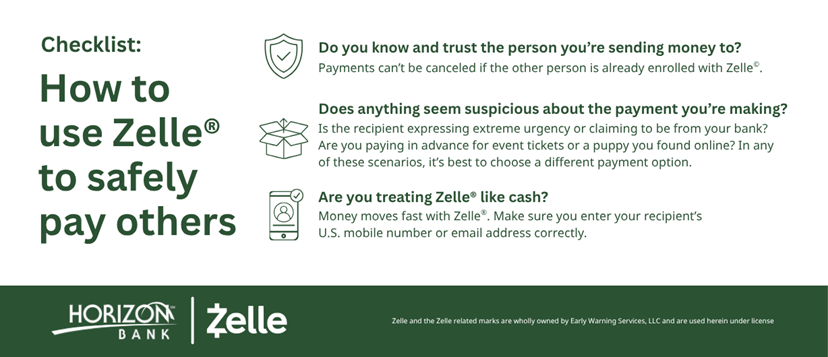
Callers demanding payment via gift cards, Zelle, or wire transfers
Messages that appear to be from known companies but come from strange numbers
How to Protect Yourself
Don’t click on links in texts from unknown or unverified sources
Banks and businesses will never ask for PINs or security codes over the phone
If a caller claims to be from your bank, hang up and call the official number yourself
Block and report suspicious phone numbers or text messages
Enable spam filters or call blocking tools on your phone for extra protection
Spoofed Websites (Pharming)
Pharming scams redirect you to fake websites that look identical to real ones—like your bank, favorite retailers, or government portals. You might click a link from an email or mistype a web address, landing on a fraudulent site without realizing it. Once there, any personal information you enter—like usernames, passwords, or card numbers—goes straight to the scammer.
Web addresses that look slightly off (like “horizonbannk.com” instead of “horizonbank.com”)
Missing security features like the padlock icon or “https://” in the browser
Websites that feel slightly “off”—broken images, misspellings, or strange formatting
Pop-ups asking you to urgently verify or re-enter your login details
How to Protect Yourself
Always type the URL directly into your browser—don’t rely on email links
Double-check that the site has “https://” and a padlock icon before logging in
Bookmark trusted sites and use those saved links when possible
Avoid clicking login links from emails, texts, or ads—even if they look official
Update your browser and security software regularly to block known phishing sites
Elderly Scams
Scammers often target older adults by preying on emotions like fear, trust, or urgency. They may pretend to be a grandchild in trouble, a fake tech support agent, a Medicare representative, or even a romance interest. These scams usually pressure victims into sending money quickly through wire transfers, Zelle, gift cards, or mailing cash.
Get connected to services for older adults and their families (health, housing, insurance, and more) at this government resource. You can also speak with a specialist at 1-800-677-1116.
Look for urgent language, strange links, misspelled addresses, or requests for personal information. When in doubt, don’t click—go directly to the company's website or call them using a verified number.
You’re likely okay, but it’s smart to run a virus scan immediately. If you entered login credentials or personal information, change your passwords right away and contact your bank if sensitive data was shared.
Simply opening an email usually isn’t dangerous—but clicking links, downloading attachments, or replying could compromise your device or your information.